Cull Hasselblad shoots fast.

Palomino moves you through a big 3FR shoot in minutes.

Palomino is a fast, focused culling app for macOS. It reads the JPEG preview embedded in every Hasselblad 3FR and FFF file, so you move through thousands of frames without waiting on a single RAW to decode. Rate the keepers, skip the rest, and hand a tight selection to Phocus. Your photos never leave your Mac.

Request a beta build

Palomino is in limited beta for high-volume Hasselblad shooters. It runs on macOS 15 Sequoia or later, on both Apple silicon and Intel Macs.

iMessage from a photographer: This app has seriously cut my HB image culling time by 95%
A Hasselblad photographer, via iMessage

How Palomino fits alongside Phocus

Phocus is built to develop Hasselblad files, with HNCS color and HNNR detail. It was never meant to power through thousands of frames quickly, and Browse mode shows it. Palomino handles the step before Phocus, getting you from a full card down to your keepers.

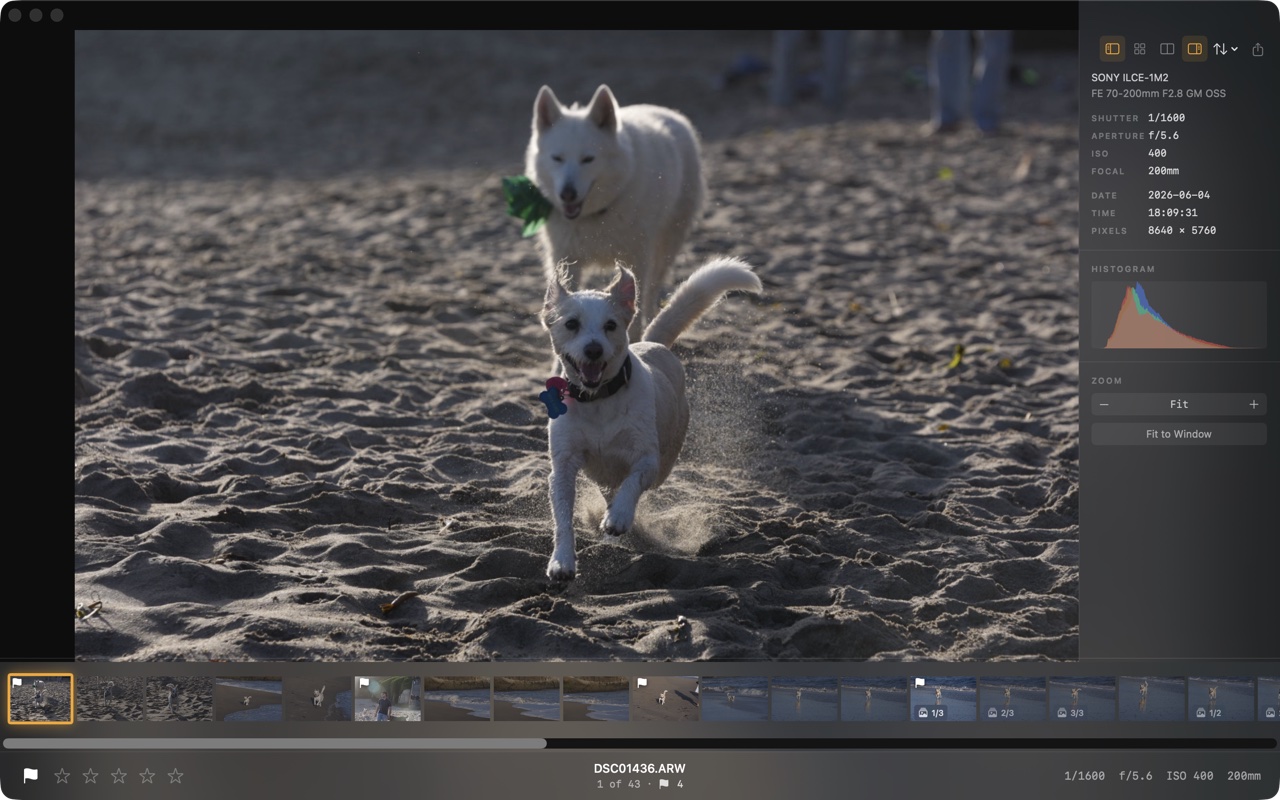
Palomino preview view: a large image with an info panel, histogram, and a filmstrip of thumbnails along the bottom
The preview view puts one frame front and center with a filmstrip underneath, close to how you already review in Phocus. Palomino reads the embedded preview instead of decoding the full sensor file, and it loads the next shot before you ask for it, so moving frame to frame never stalls. The info panel shows full exposure data and a live histogram, and your picks light up in the filmstrip as you rate from the keyboard.

Reads 3FR & FFF directly

Palomino opens Hasselblad 3FR and FFF files using the embedded JPEG preview, so there is no conversion step and no waiting. Capture One cannot open 3FR at all.

Keyboard-first culling

Press 1 to 5 to rate, P to pick, and X to reject. Each press moves you to the next frame, so you can work a whole shoot without touching the mouse.

Hands keepers to Phocus

Export your selects to a folder and open it in Phocus. You process the frames you kept instead of scrolling past the ones you did not.

The workflow

Cull the whole card in Palomino, then send the keepers to Phocus to develop. Each tool does the part of the job it is best at.

1Open the card in Palomino

Point Palomino at your shoot. Thumbnails and previews come from the embedded JPEGs, so a thousand 3FR files load fast.

2Rate and reject

Move through every frame with the keyboard, flagging keepers and rejecting the rest. Filters narrow the view to exactly what you want.

3Export keepers to a folder

Palomino copies your selects into a folder by flag or star rating, optionally splitting high-ISO frames out for denoising.

4Develop in Phocus

Open that folder in Phocus and render with HNCS and HNNR. You only handle the frames worth your time.

move   15 rate   P pick   X reject   G grid   C compare   E export

Your photos never leave your Mac

Palomino does its work on your machine. It ships in the macOS App Sandbox without the network entitlement, so it cannot upload your files. There are no accounts, no cloud, and no analytics. Your 3FR files, ratings, and folder names stay where they are. Ratings are written to standard XMP sidecar files, which XMP-aware editors like Lightroom read.

Frequently asked questions

Can I open 3FR files on a Mac?

Yes. Palomino reads both formats directly, using the embedded JPEG preview for instant display. Capture One cannot open 3FR at all.

What is the fastest way to cull a Hasselblad shoot?

Open the folder in Palomino and rate from the keyboard. Press 1 to 5 for stars, P to pick, and X to reject. Palomino shows the embedded preview instead of decoding each RAW and loads the next shot ahead of you, so a big shoot stays fast.

Does Palomino replace Phocus?

No. Phocus is where you render Hasselblad files, with HNCS color and HNNR detail, and Palomino is the fast culler in front of it. Most photographers use both. If you are new to Phocus, the Phocus user guide and what you lose skipping Hasselblad's own software are good places to start.

How do I get my selects into Phocus?

In Palomino, export your keepers to a folder, then open that folder in Phocus. You process the handful you kept instead of scrolling past everything in Browse mode.

Which Hasselblad cameras does it work with?

Palomino works with any camera that produces 3FR or FFF files, including the X2D, X1D, and 907X/CFV. For the difference between the two formats, see FFF vs 3FR.

Try it on your next shoot

Palomino is in limited beta for high-volume Hasselblad shooters. Tell me what you shoot and I will send you a build.

Request a beta build