Nobody warns you about the Sunday after the wedding.

Palomino is a Mac app that gets a wedding card down to its keepers in one sitting, so the Sunday after stays yours.

A wedding runs to several thousand frames, and the couple is waiting to see them. Palomino shows each frame the moment you press the arrow key, flags the blinks and soft frames for you, and copies your selects to a folder for your editor.

Download Palomino on the Mac App Store

Palomino is free to download and exports up to 50 photos per session. Palomino Pro removes the limit for a one-time purchase of $29.99.

It requires macOS 15 Sequoia or later and runs on Apple silicon and Intel Macs.
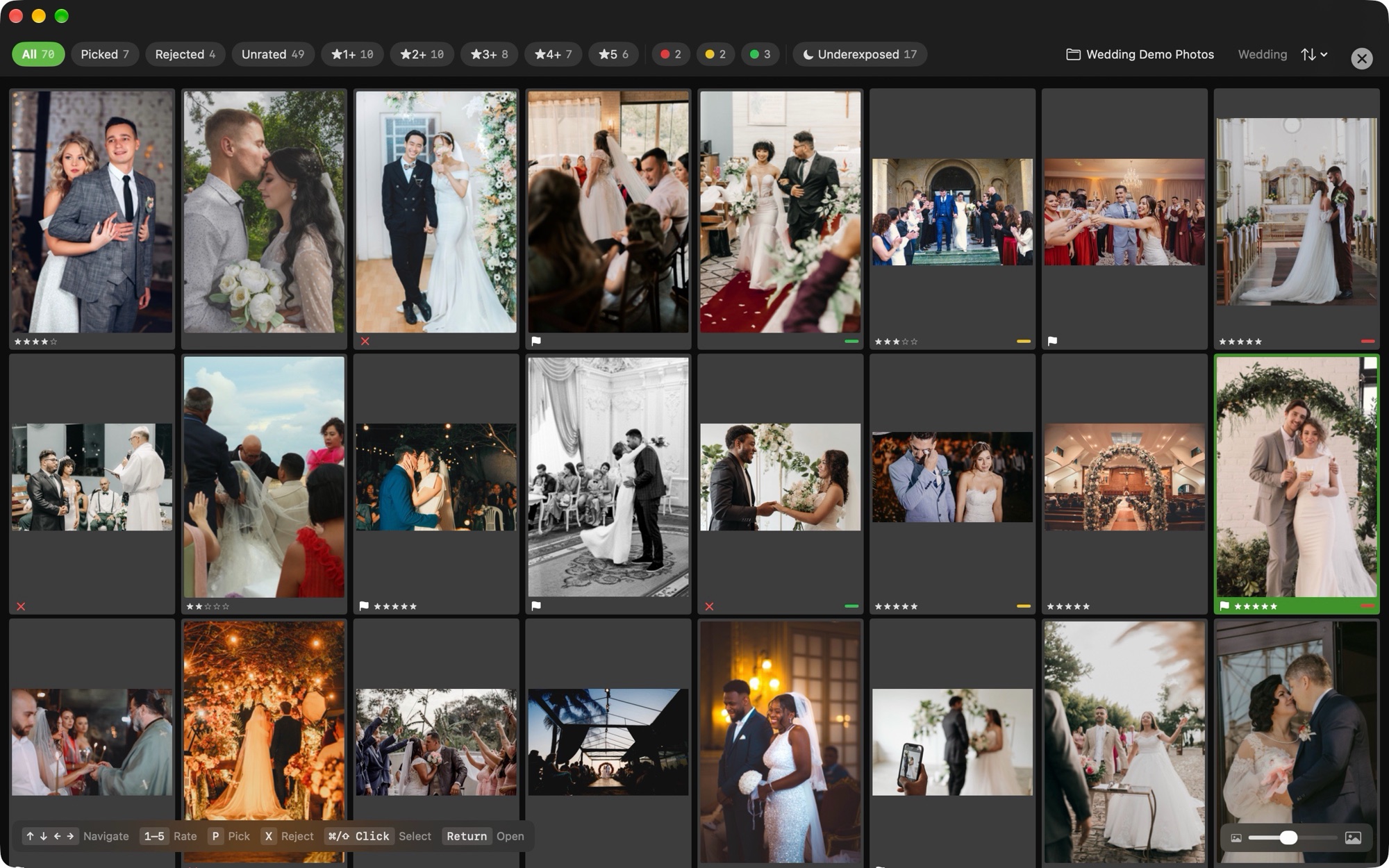
Palomino grid view of a 70-photo wedding folder, with star ratings, pick flags, rejects, and color labels on the thumbnails and a filter bar that counts picks, rejects, ratings, labels, and underexposed frames

The evening after the wedding, in Palomino

Open the card

Point Palomino at the card or at the folder you copied it to. Thumbnails and previews come from the JPEG your camera embedded in each RAW file, so a few thousand frames are ready to look through without waiting on a decode.

Check faces with one key

Press V to zoom straight to the largest face at 300 percent, so checking eyes and focus on a portrait takes one key. A badge marks frames where someone blinked, so you see them without hunting.

Settle each burst

The first kiss and the exit usually come as bursts. Palomino groups each one and puts a crown on the sharpest frame, and the reject-others shortcut keeps the crowned frame and rejects the rest in two keys.

Hand the selects to your editor

Export copies your picks or your top-rated frames to a folder, and on the same drive it lands in well under a second. Ratings travel in standard XMP sidecar files, so your editor sees the stars you gave.

You still make every pick

Every suggestion Palomino makes takes one keystroke to accept or skip. The closed-eye and soft-focus flags point you at the frames worth a second look, and the call on each frame stays with you.

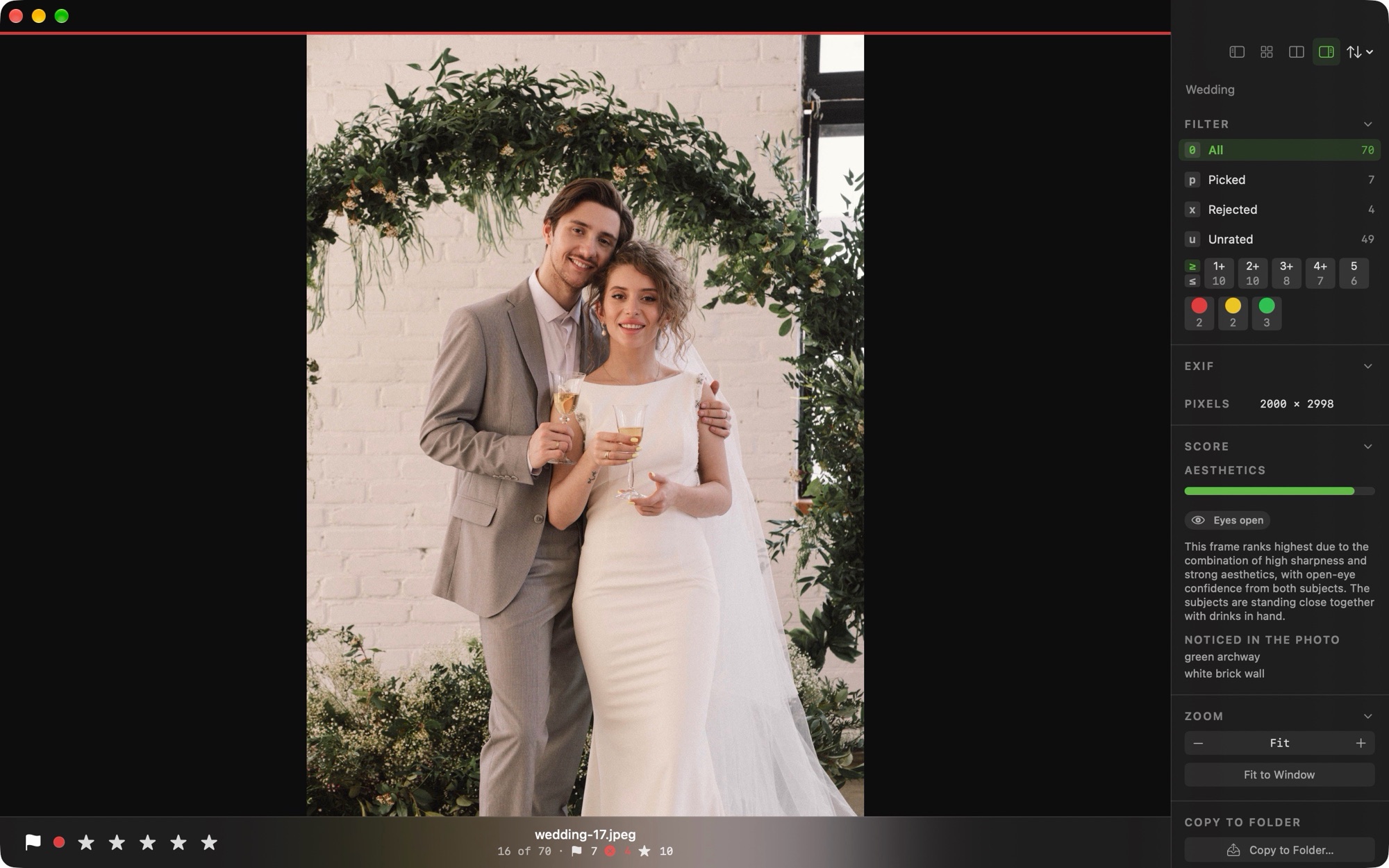
Palomino preview view of a bride and groom holding glasses of champagne under a green archway, with an info panel that shows an eyes-open badge, an aesthetics score, and a written reason for the frame's rank
Preview view The info panel shows an eyes-open check and the frame's score. Click a crown and Palomino tells you why that frame beat the others in its burst. On macOS 27, it writes that reason in words, and in a wedding folder the reason starts with the eyes.

One price, paid once

Palomino

Free

You can open and rate a full wedding in the free version, and export up to 50 photos per session.

Palomino Pro

$29.99one-time

Pro removes the export limit, so the whole set of selects goes to your editor in one export. It is a single purchase on the Mac App Store with no monthly or yearly charge.

Your clients' photos never leave your Mac

Palomino does its work on your machine. The app runs in the macOS App Sandbox and has no analytics, no tracking, and no third-party SDKs, and it never sends your photos or ratings anywhere. The only network activity is Apple handling a Pro purchase, which never involves your photos.

Frequently asked questions

Can I cull a whole wedding in the free version?

Yes. The free version opens, shows, and rates as many photos as you like, and exports up to 50 per session. Palomino Pro removes the export limit for a one-time $29.99 purchase.

Is Palomino Pro a subscription?

Palomino Pro is a one-time $29.99 purchase through the Mac App Store. You pay once, with no monthly or yearly charge.

Does Palomino find closed eyes?

Yes. Face detection runs in the background and flags frames where someone's eyes are closed. Press V to zoom to the largest face at 300 percent and check it in one key.

Will my ratings show up in my editor?

Palomino writes ratings and color labels to standard XMP sidecar files, so any editor that reads XMP picks them up when you import the folder of selects.

Does Palomino pick my photos for me?

Palomino leaves every pick to you. It flags soft and closed-eye frames and suggests a keeper in each burst, and you accept or skip each suggestion with one key.

What do I need to run Palomino?

Palomino requires macOS 15 Sequoia or later and runs on both Apple silicon and Intel Macs.

Try it on the next wedding

Palomino is free to download from the Mac App Store. Open your next wedding in it and see how the evening goes.

Download Palomino on the Mac App Store